Chatbox
Understanding and navigating the RuneScape chatbox
The Chatbox
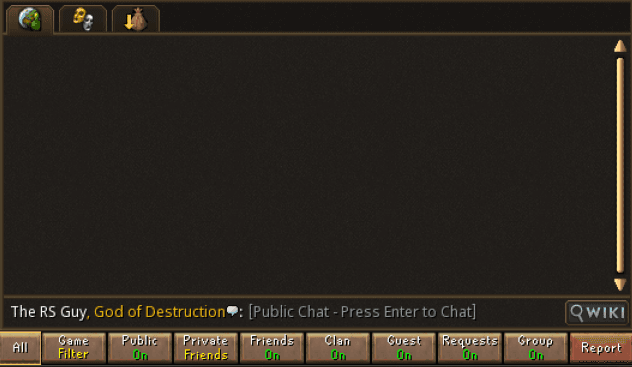
The chat interface is where you type messages to the world, your friends, your clan, or your group.
This interface looks slightly different depending on if you're using Modern or Classic mode, and you can toggle between the two chat options in settings. We recommend the Classic chat mode for functionality, and familiarity to Old School RuneScape.
| Icon | Name | Description |
|---|---|---|
 | All Chat | Combines all chats into one feed with filters in the bar above |
 | Emotes | Emotes you can use |
 | Drop Log | A log of items you've picked up |
Chat Shortcuts
Use the following shortcuts to type in specific chats from the global chat
| Command | Function |
|---|---|
| (default) | Messages sent in all chat will go to the world around you |
| tab | Respond to most recent private message |
| / | Type in friends chat |
| // | Type in clan chat |
| /// | Type in guest clan chat |
| //// | Type in group chat |
| /# or /gim | Type in group ironman chat |